How to Turn off Adaptive Cruise Control Toyota Camry 2025: Quick Guide
If you drive a 2025 Toyota Camry, you’ve probably noticed how handy Adaptive Cruise Control can be. It helps keep your distance from the car ahead and makes highway driving easier.
But what if you want to turn it off quickly and safely? Maybe you prefer full control or need to switch it off for certain road conditions. In this guide, you’ll learn exactly how to turn off Adaptive Cruise Control on your Toyota Camry 2025 without any hassle.
Keep reading, and you’ll feel confident managing this feature every time you hit the road.

Credit: www.youtube.com
Adaptive Cruise Control Basics
Adaptive Cruise Control keeps your Toyota Camry moving at a steady speed and distance from other cars. To turn it off, press the cancel button or tap the brake pedal. This stops the system and returns control to the driver.
What Is Adaptive Cruise Control?
Adaptive Cruise Control (ACC) helps keep your Toyota Camry moving at a steady speed. It adjusts speed automatically to keep a safe distance from cars ahead. It uses sensors and cameras to detect traffic conditions.
How Does It Work?
ACC maintains a set speed like regular cruise control. But it also slows down or speeds up to match traffic flow. This helps reduce the need to brake or accelerate often. It makes highway driving easier and safer.
When To Use Adaptive Cruise Control
ACC works best on highways with steady traffic. It is not meant for stop-and-go city driving. Use it in light to moderate traffic for smooth driving. Always stay alert and ready to take control.
Locating Controls On The 2025 Camry
The 2025 Toyota Camry features an adaptive cruise control system. This system helps maintain a set distance from vehicles ahead. To turn it off, first find the control buttons. Knowing their location is important for safe and quick access.
The controls are designed for easy reach while driving. They are placed on the steering wheel and the dashboard. Understanding their exact spots saves time and reduces distraction.
Steering Wheel Buttons
The main adaptive cruise control buttons are on the right side of the steering wheel. You will see icons that look like a car with speed lines. These buttons let you turn the system on or off and adjust settings.
The cancel button is also on the steering wheel. Press this to deactivate the cruise control temporarily. This placement allows quick action without moving your hands far.
Dashboard Display
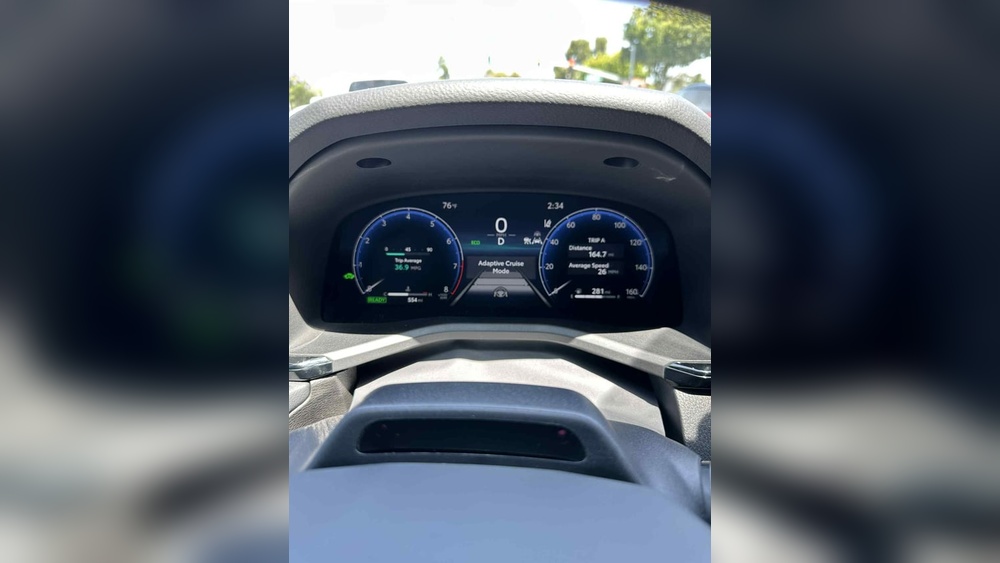
The dashboard shows the adaptive cruise control status. It uses simple icons and numbers to indicate if the system is active. This display helps confirm whether the system is on or off.
Some models have a dedicated button near the dashboard. This button also turns off adaptive cruise control. Check the area around the instrument panel for this button.
Using The Touchscreen
The 2025 Camry has an infotainment touchscreen. Some adaptive cruise control settings appear here. You can access options to customize or deactivate the system.
Navigate the menu to find the safety or driver assistance section. This part lets you control adaptive cruise control features from the screen. It gives another way to turn off the system if needed.
Steps To Disable Adaptive Cruise Control
Disabling Adaptive Cruise Control in the 2025 Toyota Camry is straightforward. This feature helps keep a safe distance from cars ahead. Sometimes, drivers prefer to turn it off for more control or different driving needs.
Follow these simple steps to turn off Adaptive Cruise Control safely and quickly. Each step ensures you understand the process without confusion.
Locate The Adaptive Cruise Control Button
Find the button on your steering wheel or nearby. It usually has a car icon with speed lines or radar waves. This button controls the adaptive system.
Press The Button To Turn Off Adaptive Cruise Control
Press the button once to disable the system. The indicator light on the dashboard will turn off. This confirms the adaptive feature is no longer active.
Use The Cruise Control Button For Manual Control
After disabling adaptive mode, use the regular cruise control button. This lets you set a fixed speed without automatic distance adjustment.
Check The Dashboard For Confirmation
Look at your dashboard to see the cruise control status. Ensure the adaptive symbol is gone. Only the standard cruise control icon should be visible.
Turn Off Cruise Control Completely If Needed
Press the main cruise control button to switch off the system fully. This stops all cruise control functions and returns full manual driving control.

Credit: www.reddit.com
Troubleshooting Common Issues
Troubleshooting common issues with the Adaptive Cruise Control (ACC) in the Toyota Camry 2025 helps avoid frustration. Understanding simple fixes saves time and keeps the drive smooth. Some problems may seem complex but have easy solutions.
Knowing what to check first can quickly solve most ACC problems. This guide explains typical issues and how to address them. Stay calm and follow the steps below.
Checking The Adaptive Cruise Control System Status
Start by checking the ACC system status on the dashboard. A warning light or message may show system errors. If the ACC icon is off or flashing, the system might be disabled. Turn the car off and restart to reset the system. This often fixes minor glitches.
Cleaning The Radar Sensor
The radar sensor, usually behind the front grille, must stay clean. Dirt, snow, or debris can block the sensor. Wipe it gently with a soft cloth and mild cleaner. Avoid using harsh chemicals or scratching the lens. A clean sensor improves ACC function.
Ensuring Proper Distance Settings
Check the distance settings on the ACC controls. If the gap is set too close or too far, the system may behave oddly. Adjust the distance to a comfortable space between your car and the vehicle ahead. This helps the ACC respond correctly.
Verifying Software Updates
Outdated software can cause ACC errors. Visit a Toyota dealer to check for updates. Dealers can update the vehicle’s system to the latest version. Software updates improve performance and fix bugs.
Inspecting Vehicle Speed And Conditions
Adaptive Cruise Control may not work well in some conditions. Heavy rain, fog, or sharp curves affect sensor performance. The system may turn off automatically for safety. Drive carefully and switch off ACC manually if needed.
Safety Tips When Using Cruise Control
Adaptive cruise control helps maintain speed and distance but needs careful use. Turning it off in a 2025 Toyota Camry is simple and improves safety in complex traffic. Stay alert and ready to take control at any moment.
Understanding Your Surroundings
Always watch the road closely while using cruise control. Stay alert for traffic changes and obstacles. Your attention helps prevent accidents. Adaptive cruise control can adjust speed, but it does not replace your judgment.
Keep Your Hands On The Wheel
Do not let go of the steering wheel. Cruise control handles speed, not steering. Your hands must stay ready to steer or brake. This ensures quick responses to sudden events.
Use Cruise Control On Highways Only
Set cruise control on open roads with little traffic. Avoid using it in heavy city traffic or on winding roads. These conditions require frequent speed and steering changes.
Be Ready To Turn Off Adaptive Cruise Control
Know how to disable adaptive cruise control quickly. Press the off button or tap the brake pedal. This helps regain full control when needed fast.
Adjust Speed For Road Conditions
Lower your set speed in rain, fog, or snow. Slower speeds reduce the chance of slipping. Cruise control does not adjust for all weather risks.
Credit: www.youtube.com
Frequently Asked Questions
How Do I Disable Adaptive Cruise Control On Toyota Camry 2025?
Press the “OFF” button on the cruise control switch located on the steering wheel. This action turns off Adaptive Cruise Control instantly. The system will no longer adjust speed automatically.
Can I Turn Off Adaptive Cruise Control Temporarily?
Yes, pressing the brake pedal deactivates Adaptive Cruise Control temporarily. The system stays off until you reactivate it by pressing the “RES” or “SET” button. This lets you control speed manually for a short time.
Will Turning Off Adaptive Cruise Control Affect Regular Cruise Control?
No, turning off Adaptive Cruise Control does not disable regular cruise control. You can still use standard cruise control to maintain a set speed. Both systems work independently.
Is It Safe To Turn Off Adaptive Cruise Control While Driving?
Yes, it is safe to turn off Adaptive Cruise Control anytime during driving. Just be ready to control your speed and distance manually. Always stay alert and drive carefully.
Conclusion
Turning off Adaptive Cruise Control on your 2025 Toyota Camry is simple. Just follow the steps carefully. This lets you control your speed manually. It also helps in tricky driving situations. Remember to stay alert and drive safely. Your car is designed to assist, not replace you.
Practice these steps to feel confident behind the wheel. Safe driving makes every trip better. Keep your focus on the road at all times. Enjoy the comfort of your Camry with full control.