Does the Kia Telluride Have Wireless Apple Carplay? Complete Guide
Are you curious if the Kia Telluride offers wireless Apple CarPlay? If you rely on seamless connectivity and want to keep your phone hassle-free while driving, this question matters a lot.
Imagine not having to plug in your iPhone every time you get behind the wheel—sounds convenient, right? In this post, you’ll discover whether the Kia Telluride supports wireless Apple CarPlay, what options you have if it doesn’t, and how to get the best tech experience from your SUV.
Keep reading to find out exactly how to stay connected on the road without the cords getting in your way.

Credit: www.youtube.com
Wireless Apple Carplay Availability
The Kia Telluride offers a modern infotainment system that supports Apple CarPlay. Many drivers want to know if it supports wireless Apple CarPlay. Wireless Apple CarPlay allows you to connect your iPhone without using a USB cable. This feature adds convenience and reduces clutter in the cabin.
Let’s explore the availability of wireless Apple CarPlay in the Kia Telluride. Understanding this can help you decide if the Telluride meets your tech needs.
Wireless Apple Carplay In Latest Kia Telluride Models
Recent Kia Telluride models include wireless Apple CarPlay. This means you can connect your iPhone via Bluetooth and Wi-Fi. The connection activates automatically after the first setup. Wireless CarPlay is standard or available on higher trims depending on the model year.
How To Use Wireless Apple Carplay In The Telluride
To use wireless Apple CarPlay, start by pairing your iPhone with the car’s Bluetooth. Follow prompts on the infotainment screen. After pairing, the system will switch to CarPlay mode. You can control apps, navigation, and music hands-free.
Compatibility And Requirements
Your iPhone needs to run iOS 9 or later for wireless CarPlay. The Kia Telluride’s software must also be up to date. Not all Telluride trims support wireless CarPlay, so check your vehicle’s specifications. Using wireless CarPlay may slightly affect battery life on your phone.
Wired Apple Carplay Setup
The Kia Telluride offers a simple way to connect Apple CarPlay using a wired setup. This method ensures a stable and fast connection between your iPhone and the vehicle’s infotainment system. You just need a compatible Lightning cable to get started.
Wired connection guarantees smooth performance without any lag or interruptions. It also allows you to charge your phone while using Apple CarPlay. The setup process is straightforward and user-friendly.
Preparing Your Iphone And Cable
Use an Apple-certified Lightning to USB cable. Check that the cable is in good condition for reliable data transfer. Make sure your iPhone is updated to the latest iOS version. This helps avoid compatibility issues during setup.
Connecting To The Kia Telluride
Plug the Lightning end of the cable into your iPhone. Connect the USB end to the Kia Telluride’s USB port. The port is usually located near the center console or dashboard. The infotainment screen will detect your phone automatically.
Activating Apple Carplay On The Infotainment Screen
Once connected, a prompt appears on the screen. Select “Apple CarPlay” to start the connection. Accept any permission requests on your iPhone to allow access. The system may ask you to enable CarPlay in your iPhone’s settings if not done already.
Using Apple Carplay Safely
After setup, use the touchscreen or voice commands to control apps. Apple CarPlay supports navigation, music, calls, and messages. Keep your eyes on the road and hands on the wheel. The wired setup ensures your phone stays charged during your drive.
Using Wireless Carplay Adapters
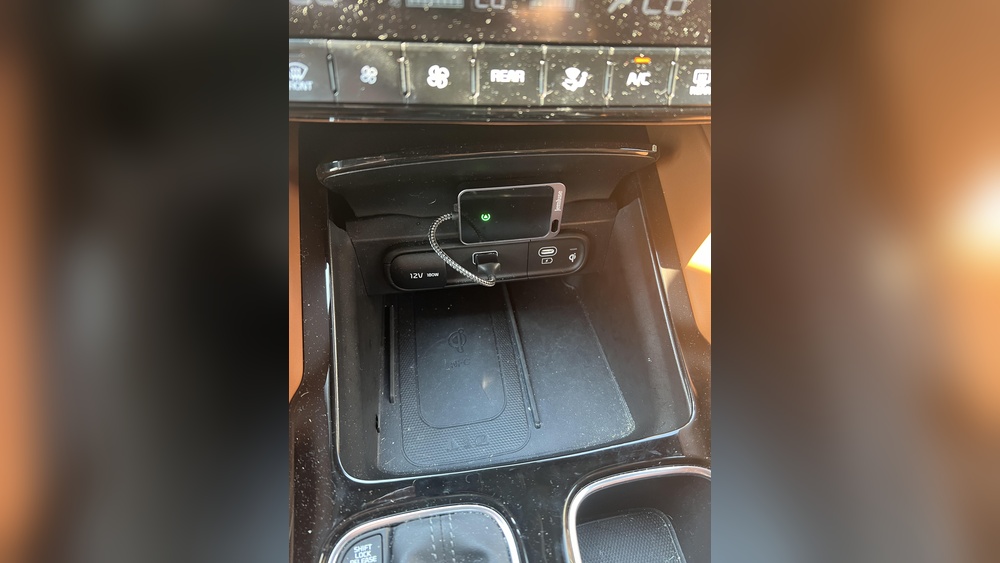
Wireless Apple CarPlay does not come built-in with the Kia Telluride. Many drivers want the convenience of wireless connectivity without cables. Wireless CarPlay adapters offer a practical solution. These small devices plug into the vehicle’s USB port. They create a wireless link between your iPhone and the car’s infotainment system.
Using a wireless adapter can free you from using a Lightning cable. The adapter connects via Bluetooth and Wi-Fi, enabling wireless CarPlay features. It works by bridging the gap where the vehicle’s system only supports wired CarPlay. This method brings the modern convenience of wireless connection to older or non-compatible systems.
How Wireless Carplay Adapters Work
Adapters plug into the Kia Telluride’s USB port. They pair with your iPhone via Bluetooth. Then, they create a Wi-Fi connection for CarPlay data. This setup allows you to use CarPlay without plugging in your phone each time. The adapter handles communication between your phone and the car’s display.
Choosing The Right Adapter
Not all wireless CarPlay adapters are the same. Look for devices with good reviews and fast connection times. Some adapters support both Apple CarPlay and Android Auto. Consider compatibility with your Telluride’s model year and infotainment system. A reliable adapter ensures stable, lag-free performance on the road.
Setting Up A Wireless Carplay Adapter
Plug the adapter into the USB port. Pair your iPhone via Bluetooth with the adapter. Follow the adapter’s instructions to connect over Wi-Fi. Once connected, CarPlay should launch automatically. Some adapters may need firmware updates for optimal performance. Setup usually takes just a few minutes.
Benefits Of Using Wireless Adapters
Wireless adapters reduce cable clutter inside your car. They provide easier access to CarPlay features while driving. You can use Siri, maps, music, and calls without wires. The adapter lets you keep your phone in your pocket or bag. It adds wireless convenience to the Kia Telluride’s infotainment system.

Credit: www.youtube.com
Troubleshooting Carplay Issues
Sometimes, Apple CarPlay may not work properly in the Kia Telluride. This can cause frustration, especially during drives. Troubleshooting CarPlay issues helps you get back on track quickly. The steps below cover common problems and simple fixes.
Check Your Iphone Connection
Ensure your iPhone is unlocked and nearby. Wireless CarPlay requires Bluetooth and Wi-Fi to be on. Try toggling both off and on again. Restart your phone if connection problems persist. Also, check if your iPhone supports wireless CarPlay.
Restart The Infotainment System
Turn off your Kia Telluride’s infotainment system. Wait a few seconds, then turn it back on. This can clear minor glitches affecting CarPlay. If available, perform a soft reset through settings to refresh the system.
Update Software And Apps
Keep your iPhone updated to the latest iOS version. Outdated software can cause compatibility issues. Update your Kia’s infotainment system software too. Check for updates in the settings or at your dealership.
Forget And Reconnect Carplay
On your iPhone, go to Settings > General > CarPlay. Select your Kia Telluride and choose “Forget This Car.” Then, reconnect by pairing your phone again. This resets the wireless connection and can fix pairing problems.
Check Usb Cable And Ports
Even with wireless CarPlay, a USB connection may be needed initially. Use an Apple-certified cable to connect your phone. Inspect the USB ports for dirt or damage. Clean gently if needed to ensure proper contact.
Kia Telluride Connectivity Features
The Kia Telluride offers a range of modern connectivity options. It keeps drivers and passengers connected on every trip. The system is designed to be simple and intuitive.
Users can connect smartphones, stream music, and use navigation easily. The infotainment system supports both Android Auto and Apple CarPlay. These features enhance the driving experience with hands-free control and apps integration.
Wireless Apple Carplay In The Kia Telluride
The Kia Telluride does not support wireless Apple CarPlay. It requires a wired connection using a USB cable. This setup ensures a stable and fast connection for using apps and navigation.
Once plugged in, Apple CarPlay appears on the infotainment screen. Drivers can access maps, messages, and music without touching their phones. The cable connection prevents interruptions during use.
Bluetooth And Smartphone Integration
Bluetooth connectivity is standard in the Telluride. It allows wireless phone calls and audio streaming. Pairing a phone is easy through the settings menu.
Bluetooth supports hands-free calling and voice commands. It also connects to multiple devices, letting passengers use their phones safely. This feature works well alongside Apple CarPlay and Android Auto.
Infotainment System And Screen Features
The Telluride comes with a large touchscreen display. The screen supports pinch-to-zoom and swipe gestures. It responds quickly to touch inputs.
Users can customize the home screen with favorite apps and shortcuts. The system includes navigation, music apps, and vehicle settings. Voice recognition helps control the system while driving.

Credit: www.reddit.com
Frequently Asked Questions
Which Kia Models Have Wireless Carplay?
Kia models like the 2026 Seltos and Sportage support wireless CarPlay. Telluride and others require wired connections.
Does The 2027 Kia Telluride Have Wireless Apple Carplay?
The 2027 Kia Telluride does not offer wireless Apple CarPlay. It supports Apple CarPlay only via a USB cable connection.
How To Connect Wireless Carplay Kia Telluride?
The Kia Telluride does not support wireless Apple CarPlay. Connect your iPhone using a USB data cable to the center console’s USB-A port to use CarPlay. Wireless functionality requires a third-party wireless CarPlay adapter.
How Do I Know If My Kia Has Wireless Carplay?
Check your Kia’s infotainment system settings for wireless CarPlay options. Most Kia models, like the Telluride, require a USB cable for Apple CarPlay. Wireless CarPlay usually appears as a pairing option under Bluetooth or connectivity settings. Consult your owner’s manual for specific model details.
Conclusion
The Kia Telluride does not support wireless Apple CarPlay. You must use a USB cable to connect your iPhone. Only the USB-A port in the center console works for CarPlay. The USB-C ports charge devices but don’t activate CarPlay. This means no wireless convenience for Telluride drivers.
Still, Apple CarPlay works well when connected by cable. This setup keeps your phone charged and connected during drives. Knowing this helps you prepare before your next trip. Simple and clear.